Protocol design · Dotty v0.1.0 · June 2026
What if every website could answer questions from an AI agent instantly, without sending a single byte of content to a third party? Dotty is a lightweight open protocol that makes this possible — by moving the expensive work offline.
The problem with how AI reads the web today
When an AI assistant answers a question about a specific product, a company’s documentation, or a niche website, something unsatisfying is happening behind the scenes. Either the agent is working from a months-old crawl by a third-party search engine, or it’s scraping raw HTML on the fly and doing expensive processing to make sense of it, or it’s relying on a proprietary RAG pipeline that requires the website owner to hand their content to yet another vendor.
None of these approaches feel right. The web has always had a tradition of machine-readable conventions that give website owners control: robots.txt to say what crawlers may access, sitemap.xml to declare what exists, schema.org structured data to describe what things mean. We have never had a standard for how a website should expose itself to a semantic query from an AI agent.
That’s the gap Dotty is designed to fill.
The expensive part of semantic search is embedding generation — and that work can be done entirely offline, before any agent ever asks a question.
The core insight: separate indexing from querying
Semantic search works by converting text into high-dimensional numerical vectors — embeddings — where similar meanings cluster together in space. Finding relevant content for a query means finding the vectors in your index that are closest to the vector of the query. The operation itself, once the vectors exist, is extremely fast: a dot product scan against a flat file completes in single-digit milliseconds for most sites.
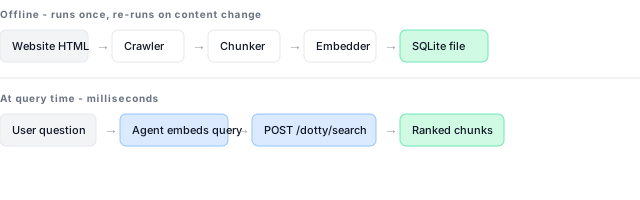
The slow, expensive part is the initial embedding generation: calling an embedding model API for every piece of content on your site. But here’s the thing — that work only needs to happen once, offline, and can be refreshed incrementally when content changes. At query time, the agent already has access to an embedding model. It can embed the user’s query in milliseconds. The website only needs to receive a vector and return ranked text.
This is the foundation of Dotty: website owners pre-embed their content and serve the search. Agents ask questions by sending vectors they computed themselves.
Why “Dotty”
The name comes from the dot product — the mathematical operation at the heart of similarity search. When embedding vectors are unit-normalised (which all major embedding models do by default), cosine similarity between two vectors reduces to their dot product alone:
cosine_similarity(q, d) = q · d    (when |q| = |d| = 1)

similarity(query, chunk) = Σ(q_i × d_i)  for each dimension i
This is why vector search is so fast: it’s just multiplication and addition, trivially parallelisable across CPU cores. No language parsing, no inverted index traversal, no network calls. The entire search runs in the same process as the web server, against a local file.
How the protocol works
Dotty defines three HTTP routes and one manifest file: GET /dotty.json, POST /dotty/search, and GET /dotty/health. That’s the whole protocol.
Step 1 — Discovery
An agent discovers that a website supports Dotty by fetching /dotty.json from the root. The manifest is generated during indexing and served from your index directory — no separate static copy is required when you use the reference Flask routes.
{
  "dotty": "0.1.0",
  "name": "Acme Docs",
  "description": "Documentation for Acme products",
  "search_endpoint": "/dotty/search",
  "last_indexed": "2026-06-01T12:00:00Z",
  "models": [
    {
      "model_id": "openai/text-embedding-3-small",
      "dimensions": 1536,
      "chunk_count": 842,
      "distance_metric": "cosine"
    },
    {
      "model_id": "nomic/nomic-embed-text-v1.5",
      "dimensions": 768,
      "chunk_count": 842,
      "distance_metric": "cosine"
    }
  ]
}
The manifest declares which embedding models have been indexed. An agent reads this list, picks the model it has access to, and proceeds. A site can support as many models as it likes — different agents will use whichever model they prefer.
Step 2 — Query
The agent embeds the user’s question using its chosen model and sends the resulting vector to the search endpoint:
POST /dotty/search
{
  "model_id": "openai/text-embedding-3-small",
  "vector": [0.021, -0.143, 0.087],
  "top_k": 5
}
The server runs a KNN search against the pre-built SQLite vector index and returns the most relevant text chunks:
{
  "model_id": "openai/text-embedding-3-small",
  "results": [
    {
      "chunk_id": "abc123def456",
      "text": "To configure timeout settings, open config.yaml...",
      "url": "https://acme.com/docs/config",
      "title": "Configuration Reference",
      "score": 0.91,
      "metadata": {}
    }
  ],
  "query_time_ms": 7
}
Seven milliseconds. No embedding API called on the server side. No third-party service involved. Just a dot product scan against a local file.
Health check
GET /dotty/health confirms that the index files are present on disk. It does not run a search query — use the project’s test_dotty_search.py script (or a real embed-and-search flow) to verify search works end to end.
How it compares to existing approaches
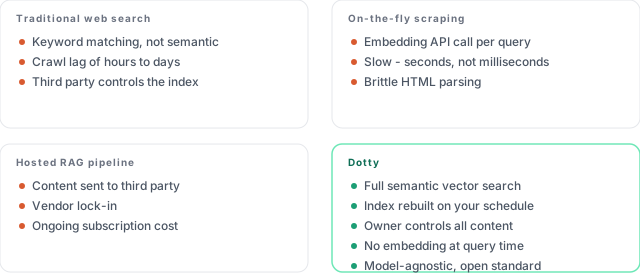
| Approach | Limitations |
|---|---|
| Traditional web search | Keyword matching, not semantic; crawl lag; third party controls the index |
| On-the-fly scraping | Embedding API per query; slow; brittle HTML parsing |
| Hosted RAG pipeline | Content sent to third party; vendor lock-in; ongoing cost |
| Dotty | Semantic search; owner-controlled index; no embedding at query time; model-agnostic |
Multi-model support: the model negotiation handshake
One of Dotty’s more unusual design choices is that a single site can pre-compute vectors for several different embedding models simultaneously. This is the protocol’s answer to model fragmentation in the AI ecosystem.
An agent built on OpenAI’s stack will embed queries with text-embedding-3-small. An agent running on AWS Bedrock will use Titan Embed. A Cohere-based agent will use embed-english-v3. A self-hosted agent might use Nomic via Ollama. Without multi-model support, a site would have to pick one — excluding all agents that don’t support it.
The reference implementation supports four canonical model IDs:
| Model ID | Provider | Dimensions |
|---|---|---|
openai/text-embedding-3-small |
OpenAI | 1536 |
amazon/titan-embed-text-v2 |
AWS Bedrock | 1024 |
cohere/embed-english-v3 |
Cohere | 1024 |
nomic/nomic-embed-text-v1.5 |
Nomic / Ollama | 768 |
A website that pre-computes vectors for the top four embedding models can be queried by any AI agent, regardless of which provider that agent was built on.
With Dotty, the manifest lists every supported model. The agent fetches the manifest, picks the best match from its own capabilities, embeds the query with that model, and searches the corresponding index. The website owner pays the embedding cost once per model during indexing; agents never pay an embedding cost at all.
The storage layer: SQLite as a vector database
Dotty uses sqlite-vec, a SQLite extension that adds KNN vector search as a virtual table. SQLite is a single file, requires no server process, and deploys anywhere Python runs. A site with 500 pages, structural chunking, and support for four embedding models produces roughly 30–40 MB of total database storage — smaller than most homepage hero images.
Getting started
The reference implementation lives at github.com/dotty-protocol/dotty. Dotty has two parts: indexing (offline, run once per content update) and serving (add routes to your existing site).
1. Index your site
The indexer runs locally or in CI — not on your live server. It crawls your site, chunks HTML, calls embedding APIs, and writes SQLite vector databases plus a manifest:
git clone https://github.com/dotty-protocol/dotty
cd dotty
pip install -r requirements.txt

export OPENAI_API_KEY=sk-...

python -m indexer.cli index https://yoursite.com \
  --models openai/text-embedding-3-small \
  --output ./dotty_index \
  --name "My Site" \
  --description "Documentation for My Product"
To index against multiple models at once, pass several --models values. Inspect the result with python -m indexer.cli stats ./dotty_index.
2. Add routes to your site
For production, wire the index into your existing web app using the Flask blueprint in dotty_quickstart_example/dotty_routes.py. Copy dotty_routes.py, indexer/store.py, indexer/sqlite_backend.py, and your index directory into your project, then register the blueprint:
from dotty_routes import dotty_bp

app.register_blueprint(dotty_bp)
Set the index path via environment variable:
export DOTTY_INDEX_DIR=./dotty_index # local dev
This exposes GET /dotty.json, POST /dotty/search, and GET /dotty/health without copying the manifest to a separate static location.
3. Local testing (optional)
The bundled FastAPI server in server/app.py is for local development and protocol testing only — not intended for production:
export DOTTY_INDEX_DIR=./dotty_index
uvicorn server.app:app --reload --port 8000
Verify with python dotty_quickstart_example/scripts/test_dotty_search.py --site https://yoursite.com. For the full agent flow (fetch manifest, embed query, search), see agent_example/agent_client.py.
Deploying on AWS Lambda
If you serve Dotty from Lambda (for example via Zappa), three runtime details matter: set slim_handler: false so native wheels are not stripped; vendor a Linux vec0.so via scripts/vendor_lambda_wheels.sh (macOS pip installs vec0.dylib, which fails on Lambda); and bundle pysqlite3-binary, because Lambda’s stdlib sqlite3 cannot load the sqlite-vec extension. See dotty_quickstart_example/ZAPPA_QUICKSTART.md in the repo for the full guide.
This site is Dotty-enabled — try GET https://s8knowledge.co.uk/dotty.json to see a live manifest.
The protocol specification — the formal definition of the manifest schema, request and response formats, error codes, and versioning rules — is published as SPEC.md alongside the implementation. Implementations in other languages are explicitly encouraged.
Dotty is an open protocol. The specification, reference implementation, and this article are published under the MIT licence. Contributions, implementations in other languages, and protocol proposals are welcome on GitHub. If Dotty is useful to you, please consider making a donation to Ashgate Hospice — a charity providing free palliative care in North Derbyshire.